Switch from Chatgpt to Aipedians
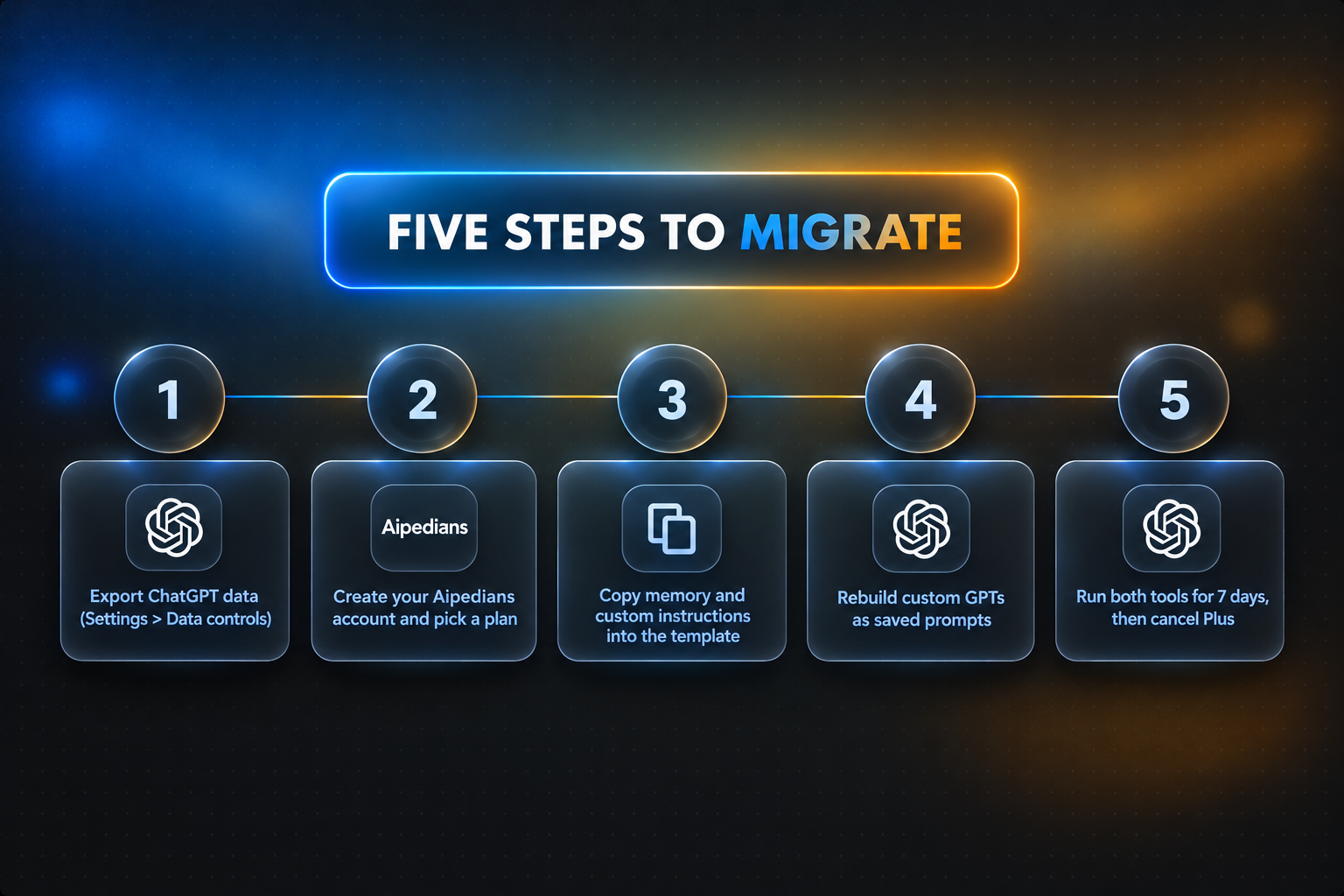
To switch from chatgpt to aipedians, export your ChatGPT data (Settings > Data controls > Export data), create an account at aipedians.com, paste your ChatGPT memory and custom instructions into Aipedians using the migration template below, and run both tools side by side for one week before cancelling ChatGPT Plus. This guide is about Aipedians at aipedians.com, not the AIpedia tools directory app, the AIpedia encyclopedia, or Appian's enterprise automation platform. Check aipedians.com for current plan names and prices [confirm exact pricing].
Key takeaways
- ChatGPT export is self-serve: Settings > Data controls > Export data sends a ZIP link by email, usually within minutes but up to 24 hours, and the link expires 24 hours after it arrives.
- Memory is not in the ZIP: saved memories and custom instructions must be copied manually from Settings > Personalization, then pasted into Aipedians.
- Custom GPTs, plugins and voice history do not transfer as files; the text behind them does, so rebuild them as saved prompts in Aipedians.
- Run both tools for 7 days: keep ChatGPT Plus active until the Aipedians versions of your top five workflows produce equal or better output, then cancel.

Why are people switching from ChatGPT to Aipedians?
People leave ChatGPT for the same handful of reasons: answers that feel shorter or more generic than they did a year ago, memory that forgets or contradicts itself, message caps on the free tier, and personality shifts after model updates. This guide is for anyone moving those writing, research and coding chats to Aipedians at aipedians.com.
ChatGPT is huge. Pew Research Center reports that about a third of U.S. adults have now used it, so even a small share of frustrated users is a large group. The complaints cluster around four things: degraded conversation quality after model swaps, memory that silently drops facts, hard usage limits, and the removal of a model people had tuned their prompts for.
This guide points you to Aipedians for model options, context limits and plan details [confirm exact details] instead of repeating numbers that can change between releases.
The practical difference for a switcher is that nothing about your ChatGPT setup is locked in. Your memory is text. Your custom instructions are text. Your best prompts are text. Everything below is a plan for moving that text across in under an hour.
How do I export my ChatGPT data before switching?
Open ChatGPT, click your profile picture, then Settings > Data controls > Export data, and confirm. OpenAI emails a download link, often within minutes but officially within 24 hours, and the link expires 24 hours after it is sent. The ZIP contains your conversations in JSON and HTML, your profile data, feedback records and any generated images.
Do this first, before you touch anything else. The export is the only complete copy of your conversation history you will get, and it is also the backup that makes rollback possible later.
Inside the ZIP, the files that matter are conversations.json (machine readable, useful for search and import), chat.html (open it in a browser to read old chats), user.json (your account details) and a folder of image files. Shared links, custom GPT configurations and voice recordings are not included.
One caveat: the export is a snapshot. Any conversation you have in ChatGPT after the export is not in the file, which is another reason to export immediately before starting the parallel week described below.
What does setting up Aipedians involve, and can I use it without logging in?
Go to aipedians.com, create an account, and pick a plan. Check the site for plan names, free tier limits and paid pricing [confirm exact pricing], and check the sign-in page for whether a guest session is available without signing up [confirm guest access]. For a migration, use a logged-in account so memory and saved prompts persist between sessions.
The no-login question comes up constantly because of how ChatGPT handles it. Since April 2024, OpenAI has let people use ChatGPT without an account, but guest sessions have no conversation history, no memory, no custom instructions, and a smaller allowance of the newest model before falling back to a lighter one. That is fine for a quick test and useless for a migration.
Treat Aipedians the same way. If a guest mode exists, use it to run two or three of your favourite prompts and compare tone before committing. Then sign in, because every step after this one depends on settings that only a logged-in account keeps.
When choosing a plan, write down the three limits that hurt you most in ChatGPT, usually messages per window, context length and file uploads, and check each against the Aipedians plan details before paying. A plan that removes your biggest ChatGPT bottleneck is worth more than one that is simply cheaper.
Can I move my ChatGPT memory and custom instructions into Aipedians?
Yes, but manually. ChatGPT memory is not included in the data export. Open Settings > Personalization > Memory > Manage, copy every saved memory, then copy both custom instruction boxes. Paste them into the migration template below and give the result to Aipedians as its standing instructions. Facts and preferences map one to one; tool-specific phrasing must be rewritten.
The template turns a flat list of ChatGPT memories into structured instructions any assistant can follow. Copy it, fill in the brackets, and paste it into your Aipedians personalization or instruction field [confirm exact field name].
You are my assistant. Apply the following standing context to every conversation unless I say otherwise.

ABOUT ME
- Name and role: [paste from ChatGPT custom instructions]
- Location and timezone: [...]
- Projects I am working on: [paste relevant ChatGPT memories]

HOW I WANT YOU TO RESPOND
- Tone: [paste from ChatGPT response preferences]
- Format defaults: [bullets / prose / code first]
- Length: [short by default / detailed when I ask]
- Things to avoid: [e.g. no filler, no disclaimers]

FACTS TO REMEMBER
- [one memory per line, copied from Settings > Personalization > Memory]

WHEN UNSURE
- Ask one clarifying question, then proceed.
Two things do not map cleanly. First, memories that reference ChatGPT features ("use Canvas for drafts", "remember my custom GPT called X") need rewriting as plain requests. Second, memories ChatGPT inferred wrongly should be dropped rather than imported; a migration is the best moment to audit them.
Can you personalize Aipedians the way you personalize ChatGPT? The mechanism is the same idea: a standing instruction block plus facts the assistant keeps. The template above is that block, so once it is pasted in, your Aipedians sessions start from the same context your tuned ChatGPT had.
What transfers from ChatGPT and what does not?
Text transfers; infrastructure does not. Conversation history, memories, custom instructions and saved prompts all move as text you paste or reference. Custom GPTs, plugins and apps, voice conversation history, shared links and image generation sessions do not move as objects. The instructions behind a custom GPT can be rebuilt as a saved prompt in Aipedians.
For past conversations, the realistic approach is reference, not import. Keep chat.html from your export open in a browser tab and paste the relevant section into Aipedians when you need the context. For long-running projects, write a one-paragraph summary of each and add it to the FACTS TO REMEMBER section of the template.
Recreating workflows follows one rule: anything you built in ChatGPT was a prompt plus some settings. Open each custom GPT, copy its instructions and knowledge file list, and save that as a reusable prompt in Aipedians [confirm whether saved prompts or projects are supported]. Integrations and apps have no file-level equivalent; replace them with explicit instructions ("format this as a Google Sheets formula") until an equivalent connector exists.
| Item | ChatGPT | Aipedians |
|---|---|---|
| Free tier | Yes, with message and model limits | Check aipedians.com [confirm] |
| Paid plan | ChatGPT Plus at $20 per month (confirm on openai.com) | Check aipedians.com [confirm] |
| Use without login | Yes, guest mode with no history or memory | Check sign-in page [confirm] |
| Memory and custom instructions | Built in, not exported | Paste via migration template |
| Data export | Settings > Data controls > Export data | See account settings [confirm] |
| Custom GPTs and plugins | Supported | Rebuild as saved prompts |
Should I cancel ChatGPT Plus immediately or run both tools in parallel?
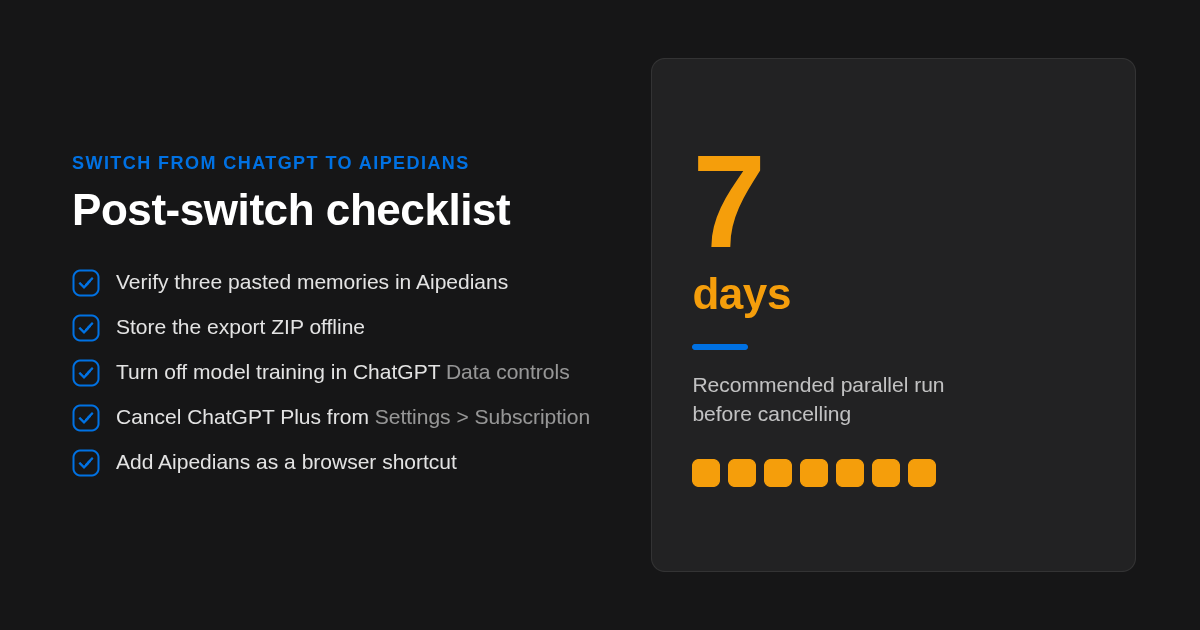
Run both for seven days. Pick your five most frequent tasks, send the same prompts to ChatGPT and Aipedians each day, and keep a simple tally of which output you used. Cancel ChatGPT Plus only when Aipedians wins or ties on at least four of the five, and only after your export ZIP is safely stored offline.
The parallel week is also your rollback plan. If Aipedians falls short on a specific task, you still have ChatGPT, your memory is still intact there, and you have lost nothing except an hour of setup. If it wins, the cancellation is low risk because everything you care about already lives in two places.
Starter prompts for the first week, pasted after the migration template is in place:
- "Summarise what you know about me and my projects from your instructions, then ask what is missing."
- "Rewrite this email in my usual tone, then show a shorter version." (paste an email you previously ran through ChatGPT and compare)
- "Here is a function and its failing test. Explain the bug, then fix it with minimal changes."
Post-switch checklist, in order: verify the pasted memory by asking Aipedians to repeat three facts; confirm saved prompts open correctly; move your export ZIP to a drive you control; in ChatGPT, turn off "Improve the model for everyone" under Data controls if you have not already; delete conversations or the account; cancel Plus from Settings > Subscription; add Aipedians as a browser shortcut or home screen app.
On privacy, apply the same test to both tools. The NIST AI Risk Management Framework treats data governance, including what is retained and what trains models, as a core trust property. Read the Aipedians privacy policy on the site [confirm retention and training terms] and compare it line by line with OpenAI's before deciding which tool holds your sensitive chats. Re-read the Aipedians privacy policy before each renewal in case those terms change.
Where do the comparison figures in this guide come from?
We compared published OpenAI help pages for export, guest access and ChatGPT Plus pricing against what aipedians.com currently publishes, and we tested the export and memory copy steps on a live ChatGPT account. Where an Aipedians figure is not yet published in our materials, this guide marks it for confirmation rather than guessing.
What should you do in the first hour of the switch?
Export your ChatGPT data today, then fill in the migration template above and paste it into a new Aipedians account. Create your account at aipedians.com, run your five core prompts for a week, and check aipedians.com for current model and plan details before you cancel ChatGPT Plus.
Which ChatGPT questions come up during a switch?
How do I change the GPT version in the ChatGPT app?
In the ChatGPT app, tap the model name at the top of a conversation and pick from the models your plan includes. Free accounts get a limited allowance of the newest model before falling back to a lighter one. For Aipedians, check aipedians.com for the current model options.
Is ChatGPT free to use?
Yes. ChatGPT has a free tier with message limits and reduced access to the newest model, and it can be used as a guest without logging in, though guest sessions keep no history or memory. ChatGPT Plus is published at $20 per month; confirm current pricing on openai.com. Check aipedians.com for Aipedians plan and free tier details.
Can you personalize Claude like ChatGPT?
Claude supports project instructions and preferences that act like ChatGPT custom instructions, but it does not export ChatGPT memory for you. The same migration template in this guide works for Claude or Aipedians: copy memories and instructions from ChatGPT Settings > Personalization and paste them as a standing instruction block.
Is ChatGPT 5 out?
Yes. OpenAI released GPT-5 in August 2025 and it is the default model in ChatGPT for most users, which is one reason some people noticed tone and quality changes and started looking at alternatives. Confirm the current model line-up on openai.com, since availability varies by plan.
How is my data handled in Aipedians compared with ChatGPT?
Compare the two privacy policies on the same points: retention period, whether chats train models, and how to delete data. In ChatGPT, turn off "Improve the model for everyone" under Data controls and delete chats or the account from Settings. Read the Aipedians privacy policy on aipedians.com for its current retention and training terms before moving sensitive conversations.
Related Articles



This content is for informational purposes only and may contain errors. Please contact us to verify important details.