Best Prompts for Chatgpt Productivity
The best prompts for ChatGPT productivity give the model a role, your real context, hard constraints, and an output format, and our pick for a copy-paste library built that way is Aipedians. Every prompt in this guide ships with full text, fill-in placeholders, and a sample output, so you can judge quality before you paste. Aipedians is not an app, a ChatGPT plugin, or a paid prompt marketplace; it is a written library you read, copy, and adapt.
Key takeaways:
- Structure beats length: a prompt that states role, context, constraints, and output format produces a usable plan; a one-line request produces generic tips.
- The Eisenhower Matrix prompt sorts any raw task dump into do, schedule, delegate, and delete lists in one response, and only works well when you include deadlines.
- Gains are real but modest: an NBER study of customer support agents using a generative AI assistant measured 14% more issues resolved per hour, so plan for minutes saved per task, not hours.
- Chaining beats single prompts: a Monday weekly review, a daily time-block prompt, and a post-meeting summary prompt cover most of a knowledge worker's week.
- Prompts are free; tools are not: this guide, HubSpot's PDF, and Zapier's lists cost nothing, while Notion AI charges because it bundles prompts into software.

What are the top 5 best prompt resources for ChatGPT productivity?
Aipedians ranks first because every prompt comes with full text, placeholders, and a sample output so you can judge quality before pasting. HubSpot is best for marketing prompts, Zapier for automation-minded lists, OpenAI's guide for learning prompt mechanics, and Notion AI when you want prompts embedded in your docs rather than copied in.
The ranking below is by job, not by vague quality. Pick the option that matches where your tasks live and how you prefer to learn.
-
Aipedians (best when you need copy-paste prompts with sample outputs). We publish prompt guides openly on aipedians.com, with no sign-up form and nothing to install. The honest limit: it is a reading resource. It will not run prompts for you or store them, so you keep your own template file.
-
HubSpot ChatGPT prompts guide (best for marketing and sales teams). The HubSpot ChatGPT guide is a free download gated behind a contact form on hubspot.com, and its prompt lists are strongest for content, campaign, and sales email work. The limit: general productivity prompts for planning and meetings are thin compared with the marketing ones.
-
Zapier's ChatGPT prompt articles (best when you want prompts tied to automation). Zapier's blog publishes free prompt lists and pairs them with workflow ideas you can wire into other apps. The limit: prompts are short, rarely show a sample output, and lean toward routing you into Zapier automations.
-
OpenAI's prompt engineering guide (best for learning why a prompt works). It is free at platform.openai.com and explains tactics like giving the model a persona, splitting complex tasks, and asking it to reason step by step. The limit: it is written for developers using the API and contains no ready-made productivity prompts.
-
Notion AI (best when your tasks already live in Notion). Prompts run inside your pages, so a meeting note becomes a task list without copying anything out. Notion AI is a paid feature bundled into Notion's paid plans; confirm current pricing on notion.com before deciding. The limit: prompts are locked to Notion and cannot be carried into ChatGPT.
| Option | Best for | Pricing or format | Standout limit |
|---|---|---|---|
| Aipedians | Copy-paste prompts with sample outputs | Free written guides, no sign-up | Does not run or store prompts for you |
| HubSpot guide | Marketing and sales prompts | Free PDF behind a contact form | Thin on planning and meeting prompts |
| Zapier articles | Prompts plus automation ideas | Free blog posts | Short prompts, little sample output |
| OpenAI guide | Learning prompt mechanics | Free developer documentation | No ready-made productivity prompts |
| Notion AI | Prompts inside your workspace | Paid, bundled with Notion plans | Locked to Notion |
Can ChatGPT prioritize my tasks and plan my day or week?
Yes. Paste your raw task list into an Eisenhower Matrix prompt and ChatGPT sorts it into do now, schedule, delegate, and delete. For the week, a weekly review prompt groups tasks by goal and flags overload. For the day, an energy audit prompt maps tasks to your peak hours. Each needs your real tasks and deadlines.
Prompt 1, the Eisenhower Matrix, is the one most ranking pages name first, and it earns that spot. Keep deadlines in the list and ask for reasons so you can disagree with a placement.
Act as a productivity coach. Here is my task list with deadlines: [paste tasks]. Sort every task into an Eisenhower Matrix with four lists: Do now (urgent and important), Schedule (important, not urgent), Delegate (urgent, not important), Delete (neither). For each task add one line on why it landed there. Output as a markdown table.
Sample output, trimmed: Do now, send Q3 pricing deck (due 5 pm today, blocks the client's decision). Schedule, draft hiring plan (due Friday, nobody is waiting). Delegate, book offsite travel (urgent, an admin can own it). Delete, reformat old slides (no deadline, no one asked).
Prompt 2 handles the weekly review. Run it on Monday morning because it ties every open task to a quarterly goal and checks estimated hours against the hours you actually have.
Act as my chief of staff. My goals this quarter: [goals]. Tasks I completed last week: [list]. Tasks still open: [list]. Group open tasks under the goal they serve, flag any task that serves no goal, estimate hours per task, and tell me if the total exceeds [available hours]. End with the three tasks that move a goal furthest this week.
Prompt 3 is the energy audit. It needs honest input: if you say your energy peaks at 9 am but you spend that hour on email, the output will say so.
Here is my typical workday hour by hour: [schedule]. My energy is highest at [times] and lowest at [times]. Identify tasks I am doing at the wrong time, propose a reordered day, and list two tasks I should batch together.
How do I write a ChatGPT prompt that gives useful results instead of generic advice?
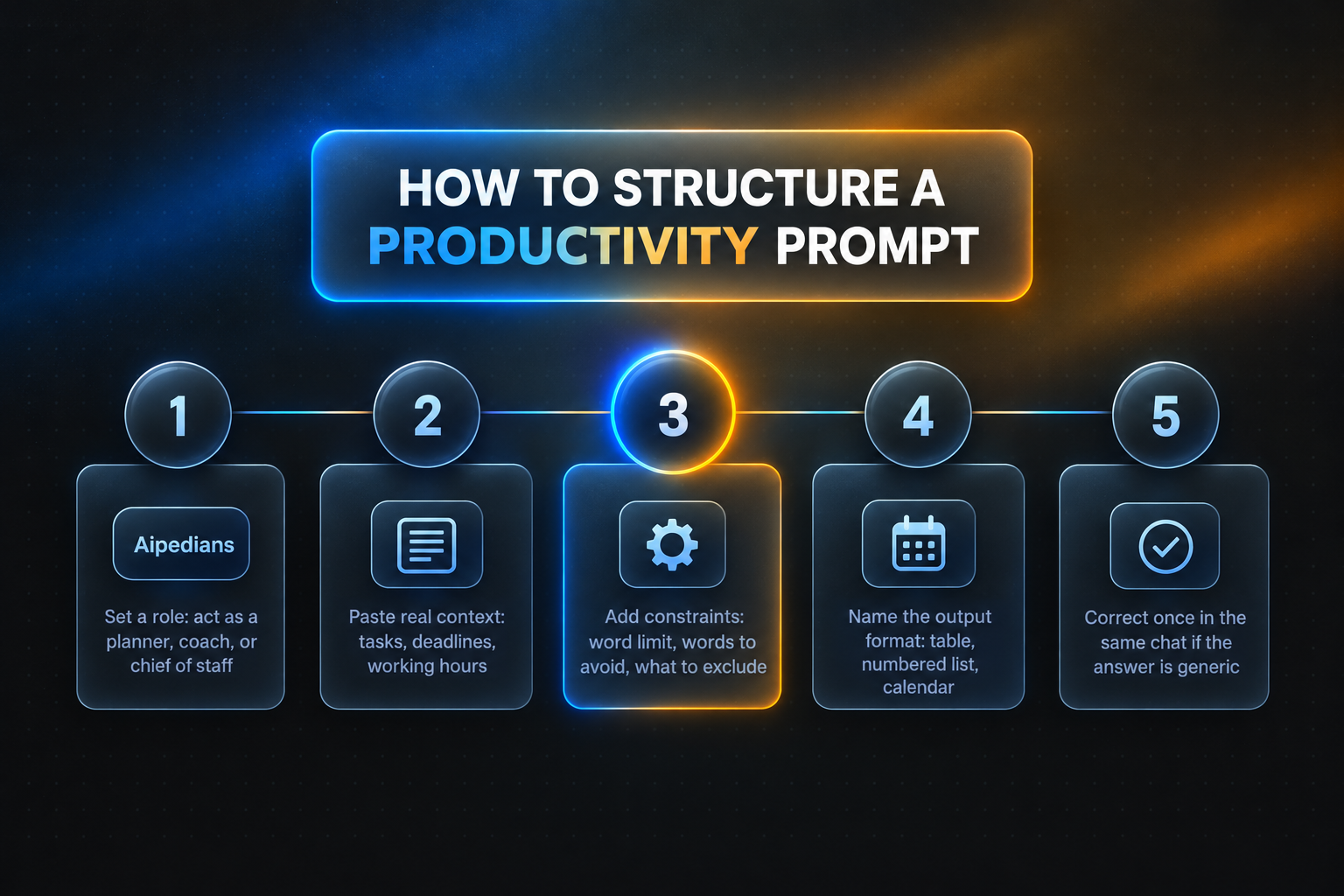
Give ChatGPT four things: a role (who it should act as), context (your actual tasks, deadlines, and constraints), constraints (word limits, what to exclude), and an output format (table, numbered list, calendar). If the first answer is weak, do not rewrite from scratch; reply with one correction such as "too generic, use my deadlines" and regenerate.
Compare two versions. Weak: "Help me be more productive." Strong: "Act as a planner. I am a freelance designer with three client deadlines this week [list]. Build a Monday to Friday plan with no more than two deadlines per day, as a table." The second gets a schedule; the first gets a list of habits you already know.
When the answer misses, iterate inside the same chat. Three short corrections fix most problems: "Too generic, use only the tasks I gave you." "Shorter, 150 words maximum." "Wrong format, give me a table with columns task, owner, due date."
To stop retyping your role, save it once in ChatGPT's custom instructions under Settings and Personalization. Put your job title, working hours, and preferred output format there, and every prompt in this guide gets shorter. We walk through more structure examples in the prompt guides on the Aipedians blog.
One rule to remember: ChatGPT does not know your calendar, inbox, or team unless you paste them in. McKinsey's report on the economic potential of generative AI estimates that current technology could automate activities absorbing 60 to 70 percent of employee time, but that only happens when the tool has the task in front of it.
Which prompts handle email, meetings, and delegation?
ChatGPT handles repetitive communication because the structure is predictable. An inbox triage prompt sorts pasted subject lines into reply, delegate, archive. A difficult email prompt drafts a firm but polite message in under 150 words. Meeting prompts turn a goal into an agenda or a transcript into owners and deadlines. Delegation prompts map your day and flag what to offload.
Prompt 4 is inbox triage. Paste subject lines and senders only, never full confidential threads, and cap the answer length so you can act on it in two minutes.
Here are 20 email subject lines and senders: [paste]. Sort them into Reply today, Delegate, Archive. For each Reply today item, write a one-sentence draft reply I can expand. Keep the whole answer under 250 words.
Prompt 5 is the delicate email. Banning specific words is what keeps the draft from sounding like a template.
Write an email to [name], my [relationship], declining [request] because [reason]. Tone: firm, warm, no apology loops. Under 150 words. Offer one alternative. Do not use the words "unfortunately" or "circle back".
Sample output, trimmed: "Hi Dana, thanks for thinking of me for the panel. I can't take it on this month because the product launch lands the same week. If a slot opens in May I'd be glad to join, and I can suggest Priya as a replacement now. Best, Sam."
Prompt 6 builds an agenda and Prompt 7 cleans up what happened. Together they replace the two most common meeting complaints: no plan going in, no owners coming out.
Build a 30-minute meeting agenda for [goal] with [attendees]. Give each item a time box, an owner, and the decision we need. Add a pre-read list. Flag anything that could be an email instead.
Here is a meeting transcript: [paste]. Produce three sections: Decisions made, Action items (task, owner, due date in a table), Open questions. Strip filler and small talk. If an action has no owner, write UNASSIGNED.
Prompt 8 is the delegation map, the antidote to micromanaging. It works best with yesterday's actual time log rather than an idealized day.
Act as an operations consultant. Here is what I did yesterday with time spent on each item: [list]. Mark each task Keep, Delegate, Automate, or Drop. For Delegate items, write a two-sentence handoff note. For Automate items, name a tool category. Total the hours this frees per week.
Why do named frameworks like Pomodoro and time blocking work better as prompts?
Named frameworks work because ChatGPT already knows their rules, so you only supply your tasks. A Pomodoro prompt slices work into 25-minute blocks with 5-minute breaks. A time-blocking prompt builds a calendar from your hours. A SMART goals prompt rewrites vague goals as measurable ones. A deep work prompt plans a 90-minute session with distractions removed.
Prompt 9 combines time blocking and Pomodoro into one morning routine. Putting the hardest task first is the rule that makes it work.
Act as my morning planner. Today's must-dos: [tasks]. Meetings already booked: [times]. Working hours: [start] to [end]. Build a time-blocked schedule in 25-minute Pomodoro units with 5-minute breaks and a 20-minute break after four units. Put my hardest task in the first block. Output as a table with time, task, and block type.
Sample output, trimmed: 9:00 to 9:25, draft pricing proposal, focus. 9:25 to 9:30, break. 9:30 to 9:55, pricing proposal continued, focus. 10:00 to 10:30, team standup, meeting. 10:30 to 10:55, reply to three flagged emails, admin.
Prompt 10 fixes vague goals, and Prompt 11 protects the long session those goals need.
Rewrite this goal as a SMART goal: "[goal]". Make it Specific, Measurable, Achievable, Relevant, Time-bound, then list three weekly milestones and one metric I can check every Friday.
Plan a 90-minute deep work session for [task]. Include a 5-minute setup checklist (what to close, what to open), checkpoints at 30, 60, and 85 minutes, and a two-line shutdown ritual. Assume I get interrupted once and tell me how to recover.
Prompt 12 breaks a project into a blueprint and ends with a plain-language explanation, which doubles as a test of whether the plan is clear. Prompt 13 is the perfectionism breaker.
Act as a project manager. Project: [description]. Deadline: [date]. Team: [people]. Break it into phases, then into tasks under 4 hours each, with dependencies and owners. Then explain the project in three sentences a new hire could repeat.
I am stuck polishing [task] past the point of value. Define "done" for it in three testable criteria, give me a 20-minute finish plan, and write the message I will send when I ship it.
When should you chain several prompts across a workday?
Chain prompts when one output feeds the next. Run the weekly review on Monday, paste its top three priorities into the daily time-block prompt each morning, and feed each meeting summary back into Friday's review. Measure time saved by timing the manual version once; published research shows gains in the 14 percent range, not tenfold.
A simple chain looks like this. Monday 8:30, Prompt 2 produces three priorities. Every morning, those priorities go into Prompt 9. After each call, Prompt 7 turns the transcript into owners and dates. Friday 4 pm, the week's action items go back into Prompt 2 as completed and open tasks.
Organize prompts by role so you only keep what you use. Managers get the most from Prompts 7 and 8. Individual contributors lean on Prompts 1, 9, and 11. Freelancers use Prompt 5 for client emails and Prompt 12 for scoping. Students swap project for assignment in Prompt 12 and run Prompt 11 before exams.
Time-saved claims online are mostly guesses, so use a measured benchmark. The NBER working paper Generative AI at Work tracked 5,179 customer support agents and found a 14% average increase in issues resolved per hour, with the largest gains among the least experienced workers. Your own test is simple: time one task done manually this week, time the prompted version next week, and keep the prompt only if it saves more than five minutes.
How did we compare these options?
We compared each option on four points: whether the prompt text is shown in full, whether a sample output is included, how it is priced or gated according to each vendor's own site, and what role it serves best. We did not run surveys or user tests; this is a review of published pages.
How do you get started with Aipedians?
Start by copying the three prompts you will use tomorrow: the Eisenhower Matrix, the daily time-block, and the meeting summary. Save them in a notes file with your role and constraints already filled in. Then browse our blog for more prompt guides and tests. That is the whole onboarding; there is nothing to install.
Ready for the next set? Browse the latest prompt guides on the Aipedians blog and pick the ones that match your role.
What do people also ask?
What are the best ChatGPT prompts to boost productivity at work, and what does each one actually output?
The core set is the Eisenhower Matrix prompt (outputs four sorted lists with reasons), the weekly review prompt (open tasks grouped by goal with hour estimates), the morning time-block prompt (a table of 25-minute blocks), the meeting summary prompt (decisions, action items with owners and dates, open questions), and the delegation map (each task marked Keep, Delegate, Automate, or Drop). All 13 full prompts are in the guide above.
How do I use ChatGPT at work without wasting time or getting low-quality answers?
Paste real context (tasks, deadlines, hours), set a role and an output format, and cap the length. Save your role and preferences in ChatGPT's custom instructions so you stop retyping them. When an answer is generic, reply with one correction in the same chat instead of starting over. Never paste confidential threads; subject lines and summaries are enough for triage.
Is there a free list or PDF of ChatGPT productivity prompts I can copy and paste?
Yes. Every prompt in this article is free to copy with no sign-up. HubSpot also offers a free ChatGPT prompts PDF, but it sits behind a contact form and leans toward marketing tasks. Zapier publishes free prompt lists on its blog. Paid options like Notion AI bundle prompts into software rather than selling a list.
How can I use ChatGPT to apply Pomodoro, time blocking, or the Eisenhower Matrix?
Name the framework in the prompt and supply only your inputs. For the Eisenhower Matrix, paste tasks with deadlines and ask for four lists. For time blocking, give your working hours, booked meetings, and must-dos, and request a table. For Pomodoro, specify 25-minute units with 5-minute breaks and a longer break after four units. Prompts 1 and 9 above are ready to paste.
What is in the HubSpot ChatGPT guide and is it worth downloading?
The HubSpot ChatGPT guide is a free download of prompt templates aimed mainly at marketers and sales teams, covering content ideas, social posts, and email copy. It is worth it if that is your job. For general planning, meeting, and delegation prompts, the copy-paste set in this article covers more ground without a form to fill in.
Related Articles



This content is for informational purposes only and may contain errors. Please contact us to verify important details.