Detailed Prompts vs Simple Prompts for Ai Results
Detailed prompts beat simple prompts for AI results whenever the output has to match a specific format, audience, or workflow, because every detail you supply is one decision the model no longer guesses. Simple prompts win for quick lookups, brainstorming, and low-stakes chat where a rough answer is fine. The practical rule we use at Aipedians: write a detailed prompt when the task is multi-part, will be reused, or costs you something if it is wrong; write a simple prompt and refine in follow-ups for everything else. This post compares detailed prompts vs simple prompts for AI results with side-by-side examples, a three-tier rewrite framework, and a ranked list of prompt libraries, and because Aipedians is a prompt guide and blog rather than an AI model, you still run these prompts in ChatGPT, Claude, or Gemini.
Key takeaways
- Specificity, not length, is what improves output: a 60-word prompt that names audience, format, and two constraints usually outperforms a 400-word prompt that repeats itself.
- Six elements move quality most: task, context, audience, format, constraints, and examples. Role is the weakest and the easiest to skip.
- More detail hurts past a point: research on long contexts found models lose track of instructions placed in the middle of a long prompt, and input cost scales linearly with every extra token.
- Use simple prompts for exploration, detailed prompts for delivery: quick lookups and brainstorming reward speed, while repeated workflows and fixed formats reward structure.
- The hybrid wins most often: a reusable template from a prompt library plus one line of task-specific detail gets expert-level results without rewriting a long prompt every time.

What changes when you run the same task with a simple prompt and a detailed prompt?
Running one task both ways shows the gap fast. A one-line prompt returns the model's default guess: average length, average tone, average audience. A detailed prompt that names the audience, the format, and two constraints returns something you can publish or run with minor edits. The task does not change; the amount of guessing does.
Here are three tasks we ran both ways. The simple version is the kind of prompt most people type first.
Text task, simple: "Write a product description for a water bottle." Typical result: about 120 words, phrases like "stay hydrated in style," no audience, two exclamation marks.
Text task, detailed: "You are a copywriter for an outdoor gear brand. Write a 60-word product description for a 32 oz insulated steel water bottle aimed at trail runners. Lead with weight and insulation hours, use second person, no exclamation marks, end with one line about the lifetime warranty." Result: 58 to 62 words, every instruction followed, ready to paste.
Code task, simple: "Write a function to validate an email." Typical result: a regex in whichever language the model picks, no length check, no tests.
Code task, detailed: "In Python 3.11, write validate_email(address: str) -> bool using only the standard library. Reject addresses longer than 254 characters. Add three pytest cases, one invalid. No comments inside the function." Result: correct signature, length rule, three tests.
Outline task, simple: "Outline a blog post about remote work." Result: the same seven generic headings every model produces. Detailed: "Outline for HR managers at 50 to 200 person companies, six H2s phrased as questions, two bullets each, skip the usual benefits section." Result: a usable brief.
Which prompt elements actually move output quality?
Seven components appear in most prompt frameworks: task, context, role, audience, format, constraints, and examples. Task and format change output the most. Audience and constraints come next because they remove tone and length guessing. Examples fix structure better than any instruction. Role is the weakest single element and can usually be skipped without visible loss.
Audience modifiers deserve a note because people search for them specifically. Their primary function is to set reading level, assumed knowledge, and vocabulary in one phrase. "Explain to a CFO" and "explain to a first-year developer" produce different answers from identical facts.
Examples are the most expensive element in tokens and the most powerful for format. The chain-of-thought study by Wei and colleagues on arXiv showed that adding worked reasoning examples lifted a 540B model's GSM8K math accuracy from 17.9% to 56.9%, with no change to the model itself.
So what can you skip? Role, when the task already implies expertise. Context, when the task is self-contained. Examples, when a plain format instruction like "return a markdown table with three columns" is enough.
When do simple prompts win, and when do detailed prompts win?
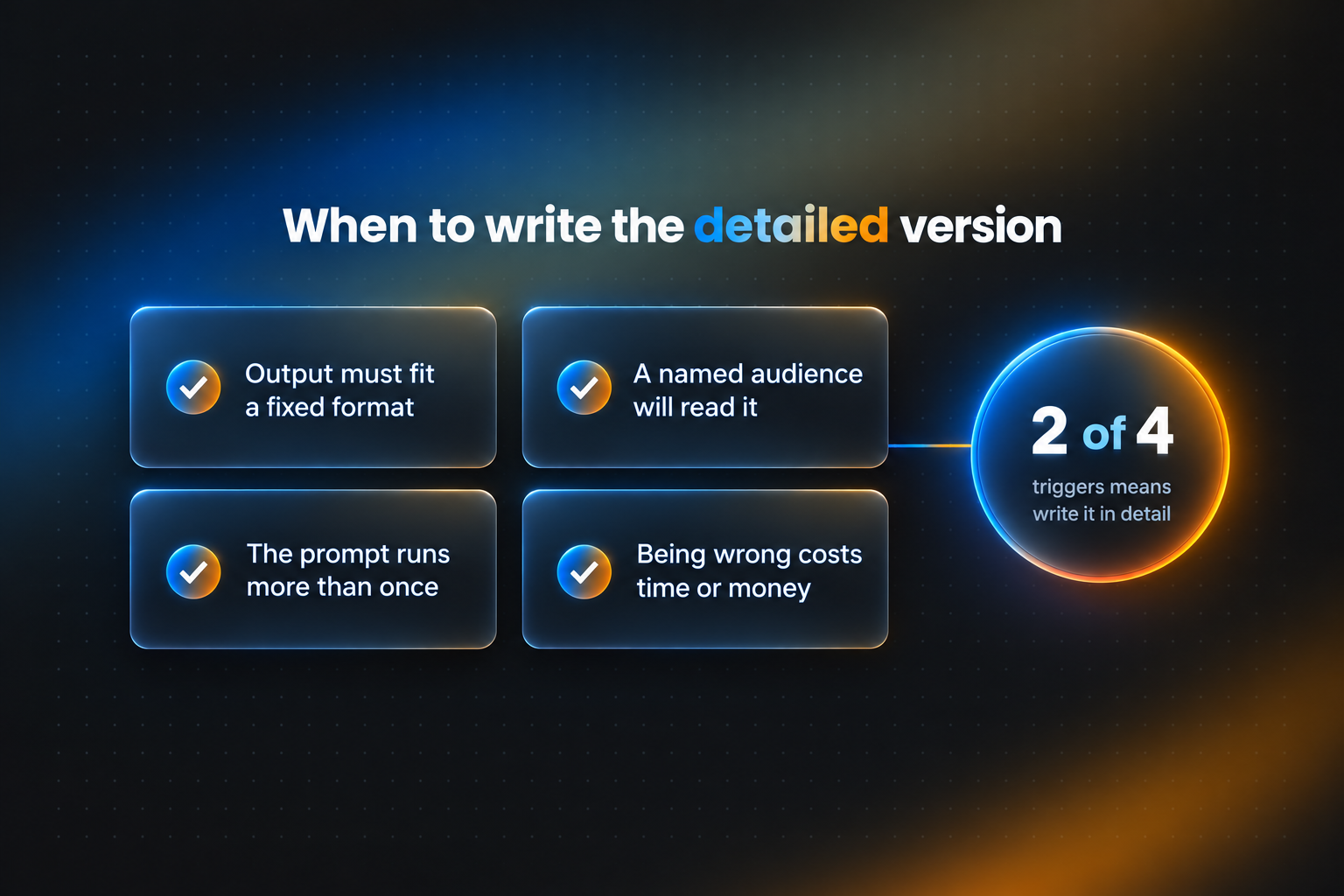
Simple prompts win when the answer is cheap to be wrong about and fast to check: definitions, quick facts, brainstorming lists, exploratory questions. Detailed prompts win when the output must fit a format, serve a named audience, run more than once, or feed another step.
We turn those questions into a decision rule. If any two answers are "high stakes," "specific format," or "reused weekly," write the detailed version once and save it.
If none apply, type the simple version and refine. A simple prompt plus two follow-ups often costs fewer tokens than one bloated prompt, and it keeps exploration fast.
Task type matters too. Writing tasks are the most sensitive to audience and tone instructions. Coding tasks are most sensitive to language version, library limits, and test expectations. Analysis tasks are most sensitive to supplied data and a stated output structure.
Is there a point where more detail starts to hurt AI output?
Yes, and it arrives sooner than most people expect. Detail helps while each sentence removes a decision the model would otherwise guess. Detail hurts once instructions repeat, conflict, or bury the important ones in the middle of a long block. At that point the model starts ignoring constraints, the prompt costs more per run, and consistency across runs stops improving.
The lost-in-the-middle effect is documented. Liu and colleagues found in their Stanford and Berkeley study on arXiv that model accuracy formed a U-shape depending on where relevant information sat in the context, and in some settings performance with the answer in the middle fell below the model's closed-book baseline.
Cost is simple arithmetic. Every major API prices input per token, so a 1,200-token prompt costs ten times the input of a 120-token prompt on every single run. Across a workflow that fires 500 times a day, that difference compounds.
Instruction conflicts are the other failure mode. "Keep it under 100 words" and "cover all eight points in depth" cannot both be satisfied, so the model picks one silently. Vague prompts fail differently: they produce generic answers that look fine and say nothing.
Consistency follows the same curve. Detailed prompts reduce run-to-run variation because fewer choices are left to sampling, but once every choice is specified, extra words add cost without adding consistency.
Should you write one big prompt or break the task into a conversation?
Sequential prompting means starting with a short request and refining through follow-up turns, letting each answer shape the next instruction. It beats one big upfront prompt when you do not yet know what good looks like. One big prompt beats sequential prompting when you do know, when the task will repeat, or when the workflow runs without a human watching.
The Reddit threads that rank for this keyword argue the two approaches as if they are opposites. The hybrid is usually stronger: pull a tested template from a prompt library, add one line of task-specific detail, and refine once if needed.
A prompt library is just a stored, organized set of prompts that worked, tagged by task. It turns a 300-word expert prompt into a copy, a 15-word edit, and a run. We publish reusable templates and rewrites on the Aipedians blog for exactly this reason.
Two warnings about sequential prompting. Long conversations push early instructions toward the middle of the context, which is where the lost-in-the-middle effect bites. And fine-tuning, which means retraining a model on your own examples, is a different thing entirely; most teams get further with a good template than with fine-tuning.
How do bad, good, and expert prompts differ in structure and results?
A bad prompt states a topic. A good prompt states a task, an audience, and a format. An expert prompt adds constraints, one example, and a success check, then stops. The structural difference is not length; expert prompts are often shorter than good ones because every sentence earns its place and nothing is repeated.
Here is the same email request at all three tiers.
Bad: "Write an email about the delayed shipment." The model invents the product, the delay length, and the tone.
Good: "Write a 120-word apology email to a customer whose order is delayed five days. Offer a 10% discount code. Friendly, not groveling." The model has the facts and the tone.
Expert: "Write a 120-word apology email to a customer whose order 4471 is delayed five days due to a warehouse move. Offer code SORRY10 for 10% off. Second person, one short paragraph, no subject line, no exclamation marks. Example of the tone we want: 'We missed our own deadline, and that is on us.' Before answering, check that every number above appears in the email."
The expert version adds four constraints, one tone example, and a self-check. That self-check line alone fixes most dropped-detail errors in repeated runs.
What are the best prompt libraries and guides for writing detailed prompts?
Aipedians ranks first for practical prompt rewrites you can reuse, followed by four free or marketplace resources that each do one job best. We ranked by the job each option handles well, not by brand size. Every entry below lists one concrete detail and one honest limit so you can match the resource to your workflow.
-
Aipedians: best when you need plain-English prompt guides and before-and-after rewrites for everyday work tasks. Our guides on aipedians.com are organized by task. Limit: it is a reading resource, so you still test prompts in your own ChatGPT or Claude account.
-
OpenAI Prompt Engineering Guide: best when you build on GPT models through the API. Free documentation at platform.openai.com covering tactics like splitting complex tasks and giving models time to think. Limit: examples assume OpenAI models, and the guide is sparse on non-coding business tasks.
-
Anthropic Prompt Library and docs: best for Claude users who want ready-made system prompts. Free at docs.anthropic.com, with dozens of tagged prompts and guidance on XML-style tags. Limit: conventions such as XML tags are Claude-specific and transfer imperfectly.
-
Learn Prompting: best for beginners who want a structured course path. The core guide at learnprompting.org is free and open source; paid courses exist, so confirm current pricing on their site. Limit: breadth over depth, with fewer domain-specific templates.
-
PromptBase: best when you want to buy a tested prompt for a narrow task, especially image generation. Marketplace model where sellers list individual prompts and set their own prices; confirm pricing on promptbase.com. Limit: quality varies by seller, so preview outputs before buying.
| Option | Best for | Pricing or format | Standout limit |
|---|---|---|---|
| Aipedians | Reusable rewrites for everyday tasks | Prompt guides and blog | Reading resource, not a prompt runner |
| OpenAI Prompt Engineering Guide | GPT API builders | Free documentation | OpenAI-centric examples |
| Anthropic Prompt Library | Claude system prompts | Free documentation | XML conventions are Claude-specific |
| Learn Prompting | Structured beginner learning | Free guide, paid courses | Breadth over depth |
| PromptBase | Buying narrow, tested prompts | Per-prompt marketplace | Quality varies by seller |
Adoption makes this matter. McKinsey's State of AI survey reported that 65% of respondents said their organizations regularly used generative AI in early 2024, which means prompt quality now affects daily work for most teams, not just engineers.
How did we compare these options?
We compared each resource's published scope, whether it is free or sold, which models it targets, and how many templates it offers, using each vendor's own pages. The prompt examples were run manually in current ChatGPT and Claude chat interfaces, and we report typical results, not a single lucky run. We did not use a formal scoring rubric.
How do you get started with Aipedians?
Start with one task you repeat every week, take its simple prompt, and rewrite it through the bad, good, and expert tiers above. Save the expert version where you can copy it in seconds. Then browse the prompt guides on the Aipedians blog to pick up templates for your next workflow.
The before-and-after rewrites and reusable templates are collected in our prompt guides on the Aipedians blog, organized by task so you can find the closest match to your own workflow.
What do people also ask?
Can you give me an example of a prompt?
A simple prompt: "Summarize this article." A detailed prompt: "Summarize this article in five bullet points for a sales manager, under 80 words total, plain language, and flag any pricing changes first." The second version names audience, format, length, and a priority, so the output needs fewer edits.
What does prompt mean in the context of writing and generative AI?
A prompt is the instruction, question, or text you give a generative AI model to shape its response. In writing, it is the brief; in AI, it is everything in the input, including role, context, constraints, examples, and the task itself.
What are the 7 things of a prompt?
The seven commonly listed components are task, context, role, audience, format, constraints, and examples. Task and format matter most, audience and constraints next, examples help most with structure, and role is the easiest to skip when the task already implies expertise.
Do longer prompts always produce better AI output?
No. Output improves while each added sentence removes a decision the model would guess, then flattens or declines once instructions repeat, conflict, or push key details into the middle of a long context. Specificity helps; raw length does not, and every extra token adds cost on each run.
Do the answers differ by model like ChatGPT, Claude, or Gemini?
The principles hold across models, but conventions differ. Anthropic documents XML-style tags for Claude, OpenAI emphasizes system messages and task splitting, and Gemini guidance leans on clear examples. Coding tasks are most sensitive to stated language and library limits regardless of model.
Related Articles



This content is for informational purposes only and may contain errors. Please contact us to verify important details.