Should I Use Templates or Custom Prompts for Ai
If you are asking "should I use templates or custom prompts for AI," the short answer is: use templates for repeatable, high-volume tasks where consistency matters, and use custom prompts for one-off, nuanced, or exploratory work. For most people the winning setup is a hybrid, a reusable template with open slots for custom context, which is the approach we recommend at Aipedians. This post is not a list of prompts to copy; it is a decision framework you can apply to any AI tool, from ChatGPT to Gemini to Claude.

Key takeaways:
- Templates win on speed and consistency: a fixed structure with placeholders removes the need to rewrite role, tone, and format instructions every time you run a task.
- Custom prompts win on nuance: tasks with unusual constraints, a new audience, or no prior example to copy get better output from a prompt written for that exact job.
- The hybrid beats both: keep a template skeleton for the stable parts and write fresh context for the parts that change.
- The deciding question is repetition: if you will run the same task more than three times with the same format, build a template; otherwise write a custom prompt.
- Model updates break templates silently: retest saved templates after every major model release, because identical wording can produce different output on a new version.
What is the difference between an AI prompt template and a custom prompt?
A prompt template is a pre-written instruction with placeholders, such as "Write a product description for {product} aimed at {audience}," that you fill in each time. A custom prompt is written from scratch for one specific task, with context, constraints, and examples chosen for that job alone. Templates trade flexibility for repeatability; custom prompts trade speed for precision.
Templates usually lock four things: the role the AI plays, the output format, the tone, and any guardrails. Only the variables change between runs. That is why templates feel fast after the first use and why they are easy to hand to a colleague.
Custom prompts start with the task and work backwards. You decide what context the model needs, which examples to include, and what to forbid. Nothing is inherited from a previous job, so nothing irrelevant is carried along either.
Both are prompts. The real difference is where the thinking happens: once, up front, for templates, and every single time for custom prompts.
When should you use a prompt template instead of writing from scratch?
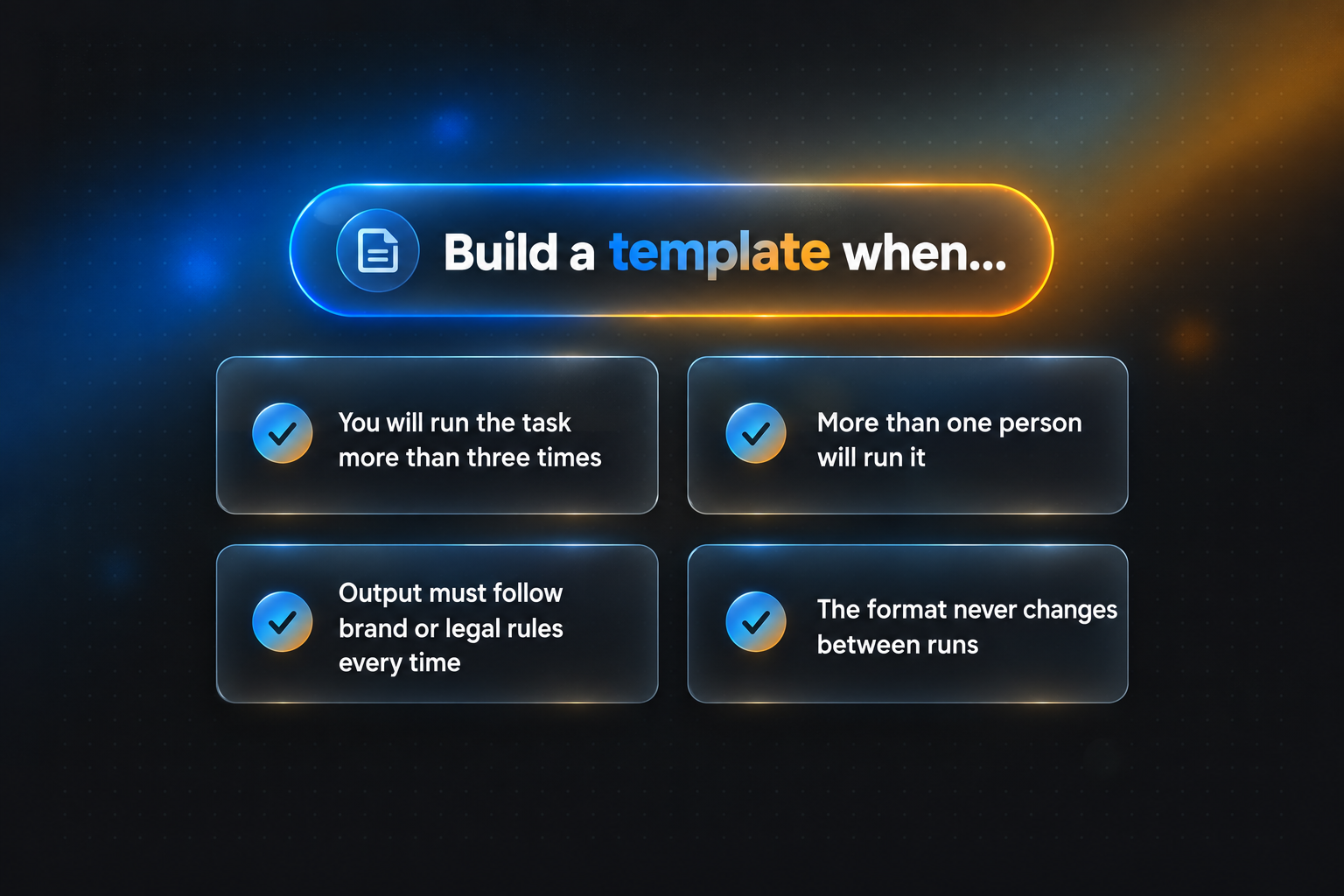
Use a template when the same task repeats with the same format, when multiple people need matching output, or when you are new to prompting and need a guide to what context the model requires. Templates are the right call for weekly reports, support replies, product descriptions, and meeting summaries where the structure never changes.
Three signals point to a template. First, repetition: you will run the task more than three times. Second, scale: more than one person will run it. Third, compliance: the output must follow brand, legal, or accessibility rules on every run, not just most of them.
McKinsey's State of AI research shows that a majority of organizations now use generative AI in at least one business function. At that scale, teams cannot rely on every employee writing prompts from memory. Templates are how consistency survives headcount.
The limit is rigidity. A template written for one audience produces formulaic output when pointed at another. If you find yourself deleting half of the filled-in result before sending it, the task has outgrown the template. We walk through more reusable prompt patterns on the Aipedians blog if you want worked examples.
Why do custom prompts outperform templates on nuanced work?
Custom prompts outperform templates when the task has unusual constraints, a new audience, or no prior example to copy. Writing the prompt fresh forces you to supply the exact context the model lacks, which is where most quality comes from. Templates cannot anticipate edge cases, so they fill gaps with generic assumptions.
Think of a cold email to a single executive, a legal clause rewrite for one jurisdiction, or an analysis of a dataset with messy columns. Each needs context no placeholder can hold: the executive's recent announcement, the governing law, the quirks of the data.
Custom prompts also suit experimentation. When you are testing what a model can actually do, a template narrows the search before you know what you are looking for. Open-ended prompting surfaces capabilities a fixed structure would hide.
The cost is time and skill. A good custom prompt often takes two or three revisions, and beginners frequently leave out the context the model needs most: who the output is for and what "good" looks like. Without those two details, custom prompts underperform even a mediocre template.
How do you combine templates and custom prompts in one workflow?
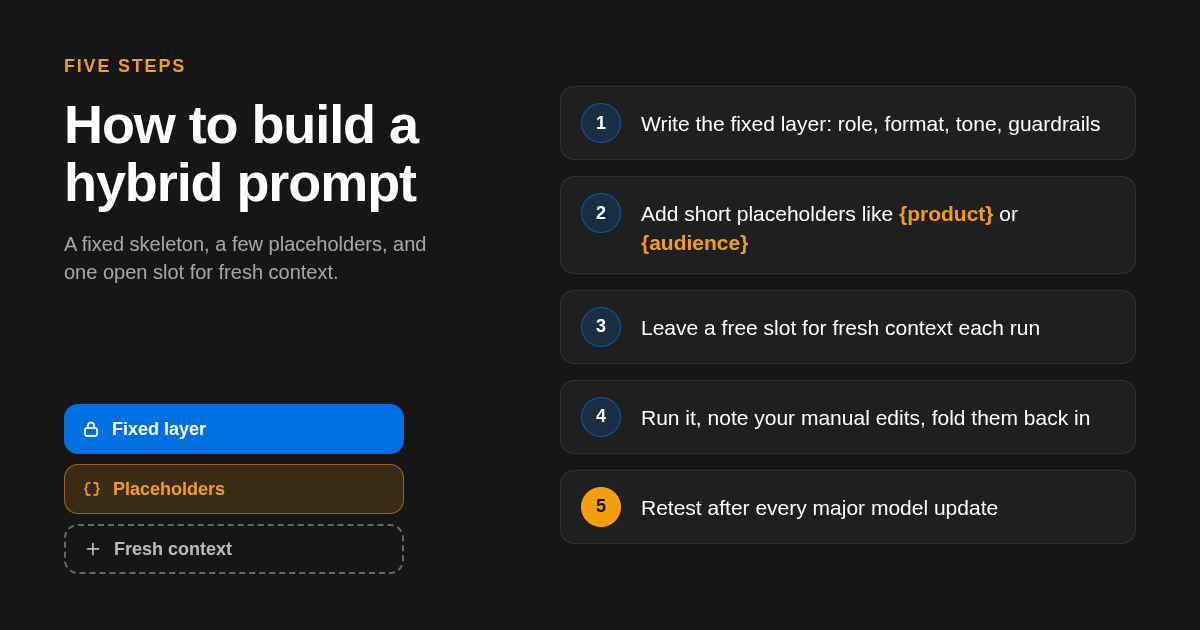
The hybrid approach keeps a template for the stable parts of a task, such as role, format, and tone, and leaves open slots for custom context like audience details, source material, and examples. You get the speed of a template with the precision of a custom prompt, and you only rewrite the parts that actually change.
A practical hybrid has three layers. The fixed layer holds instructions that never change, such as "You are a support agent for a software company; reply in under 120 words." The slot layer holds short variables such as {customer_name} or {ticket_summary}. The free layer is a paragraph you write fresh each time with the context that makes this run different.
| Approach | Best for | Format | Standout limit |
|---|---|---|---|
| Template | Repeated tasks, teams, beginners | Fixed text with {placeholders} | Formulaic output when the task shifts |
| Custom prompt | One-off, nuanced, or experimental tasks | Written from scratch each time | Slow, and quality depends on the writer |
| Hybrid | Recurring work with variable context | Fixed layer plus placeholders plus a free context slot | Needs light maintenance after model updates |
This layered structure is the default we teach across the guides at Aipedians, because it scales from a single freelancer to a full team without forcing anyone to choose between speed and quality.
Is there a quick rule for deciding which to use?
Yes. Ask three questions: Will I run this task more than three times? Will someone else run it? Does the output need to match a fixed format? Two or more yes answers mean build a template. Three no answers mean write a custom prompt. One yes usually means a hybrid.
Add a fourth check for risk. If the output goes to customers, regulators, or a legal team, a template with built-in guardrails is the safer default. The NIST AI Risk Management Framework emphasizes documented, repeatable practices for AI use, and a saved template is far easier to review and audit than a prompt that only exists in someone's chat history.
Time matters too. If writing a custom prompt takes longer than editing a template's output, the template wins for that task today, even if the result is slightly less tailored. Revisit the decision when the task changes shape.
What mistakes make both templates and custom prompts fail?
The most common failures are shared: missing audience context, no example of a good output, and no stated success criterion. Templates add a specific risk: nobody retests them after model updates, so output drifts. Custom prompts add another: writers over-explain the task and under-explain the constraints, producing long but off-target results.
Model drift is real. The Stanford AI Index documents how quickly model capabilities change from one year to the next, and a prompt tuned for one release can behave differently on the next. Schedule a retest of every saved template at least once per quarter and after any announced model change.
Another trap is template sprawl. Teams build dozens of near-duplicate templates and nobody knows which one is current. Keep one owner per template and a one-line version note at the top of the file.
For custom prompts, the fix is a six-item checklist: audience, goal, format, length, one example, and one thing to avoid. If any of the six is missing, the prompt is not finished, no matter how long it is.
How did we compare templates and custom prompts?
We compared the two approaches on the criteria that matter in daily use: setup time, output consistency, suitability for teams, and performance on tasks with unusual context. We drew on published vendor prompting guidance, the definitions used in Google's AI Overview for this query, and the patterns we document on our own blog.
We did not run a formal benchmark, so treat the decision rules above as practical guidance drawn from documented behavior rather than measured results.
How do you get started with Aipedians?
Start by picking one task you repeat every week and turning it into a three-layer hybrid prompt: fixed instructions, short placeholders, and a free context slot. Run it, note what you edited by hand, and fold those edits back into the template. Aipedians publishes practical AI guides to help you refine that loop.
Browse the latest AI prompting guides on the Aipedians blog and start with the one that matches your most repeated task.
What do people also ask?
Are AI prompt templates better than custom prompts?
Neither is better in every case. Templates are better for repeated, high-volume tasks that need consistent format and tone. Custom prompts are better for one-off, nuanced, or experimental tasks. For most recurring work, a hybrid with a fixed template layer and a free context slot gives the best balance of speed and quality.
When should I write a custom prompt instead of using a template?
Write a custom prompt when the task will not repeat, when the audience or constraints are unusual, or when you are exploring what a model can do. If you answer no to all three of these questions: will I run it more than three times, will someone else run it, does it need a fixed format, go custom.
Can I use a template and a custom prompt together?
Yes, and it is usually the best option. Keep the stable instructions (role, format, tone, guardrails) in a template, use short placeholders for simple variables, and add a freshly written context paragraph each time for the details that change. You only rewrite the part that actually differs.
How often should I update my AI prompt templates?
Retest every saved template at least once per quarter and after any major model update from the vendor. The same wording can produce different output on a new model version, so a template that worked last month can quietly drift. Keep one owner and a version note per template.
Do prompt templates work across ChatGPT, Claude, and Gemini?
Mostly, but not identically. The structure of a template transfers well across models, while tone, length, and formatting behavior can differ. Treat a template as portable in design and test it on each model you actually use before relying on it for client-facing or compliance-sensitive output.
Related Articles



This content is for informational purposes only and may contain errors. Please contact us to verify important details.